Hi Javier,
I want you to be familiar with what the user experience will be for the Report Phishing button:
Requirements
You must be using one of the following Microsoft Outlook options.
New Outlook for Windows
Outlook on the web
For all other Outlook options, including Classic Outlook, please see the Reading Task Pane Install option.
End User Experience
This is what the button will look like within the ribbon:
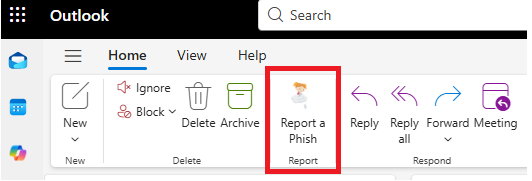
Upon clicking the ribbon button, users will be prompted to confirm that they believe the email to be malicious in nature and phishing, rather than spam. Emails reported by this method will be deleted.
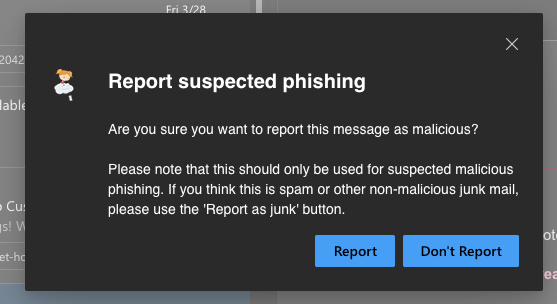
This will result in one of two follow up messages:
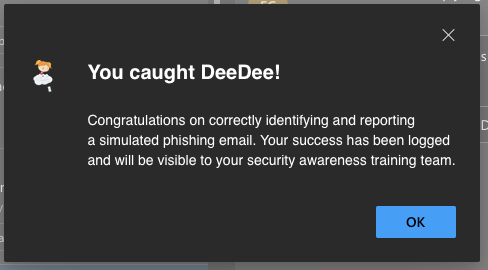
Result 1: If the email is a simulated phishing email from Huntress, the user will be congratulated on their success and the reported phish will be logged.
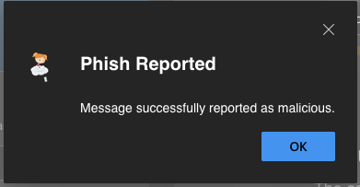
Result 2: If the email is not a simulated phishing email from Huntress ,the user will receive a message stating the phish was reported, and the message was successfully reported as malicious.
Open Space Institute Helpdesk
Steve Boxer
Pachyderm Consulting
Pachyderm Consulting
Was this article helpful?
That’s Great!
Thank you for your feedback
Sorry! We couldn't be helpful
Thank you for your feedback
Feedback sent
We appreciate your effort and will try to fix the article