Source:
https://support.microsoft.com/en-us/outlook/sharing/open-and-use-a-shared-mailbox-in-outlook
Instructed user to add shared mailbox folder into new Outlook app... This is useful for users who transitioned from older version to newer version
add them back, please try the following:
- Select Mail from the navigation pane in new Outlook.
- In the Folder pane, right-click your account name, and select Add shared folder or mailbox.
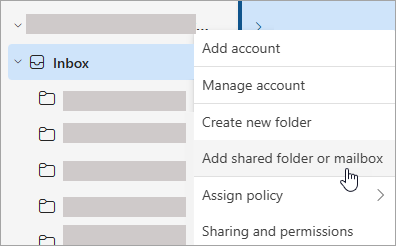
- In the Add shared folder or mailbox window, type the name of the mailbox you want to access, for example, info@osiny.org
Was this article helpful?
That’s Great!
Thank you for your feedback
Sorry! We couldn't be helpful
Thank you for your feedback
Feedback sent
We appreciate your effort and will try to fix the article